Recommended Free Tools
Start with one client question or one practice goal, film a single short video in a format your team can repeat, and publish it on channels clients already use. Judge the first videos by inquiries and bookings, not by views alone. Keep the first project small: a phone, a clear topic, one named owner, and a clinical and consent check before anything goes live.
Start with one goal, not an open-ended demand for content
“Make some videos” is too vague to produce a usable script. Before filming, decide what the first video is meant to do. The Veterinary Marketing Association (VMA) guide on video planning recommends defining an objective first, then deciding who will film, edit, and manage the content, planning around questions the audience actually asks, choosing channels, and tracking results. Your first objective might be to answer a common care question, explain one service, introduce a team member, or send viewers to the right next step, such as booking a visit.
Keep the objective narrow enough to shape the script and the call to action. “Explain our dental cleaning process so new clients know what to expect” gives you a script. “Build brand awareness” does not.
A workable first-video workflow
- Pick one question clients already ask. Front-desk calls, appointment reminders, and exam-room conversations are the best source of topics. The American Animal Hospital Association (AAHA) social-media author Cheyanne Flerx suggests a short general-education clip as a starter, such as a veterinarian giving general advice on checking a dog for ticks.
- Write a 30- to 60-second script. Cover one point, state it in plain language, and end with one clear action. Keep clinical claims general and tied to widely accepted guidance rather than individual cases.
- Assign owners. Name one person each for drafting, clinical accuracy review, recording, editing, approval, posting, and answering comments. In a small practice one person may cover several roles, but the approval step should still belong to a clinician.
- Film with what you already have. Use the phone the practice owns and a quiet room with decent daylight or a window. Confirm the clip is clear before you invest in anything else.
- Adapt the cut to each platform. The VMA guide distinguishes short-form from longer-form video and recommends platform-specific formatting. Check current aspect ratio and length limits on each platform before you edit, because those specifications change.
- Publish where clients already look. Start with the practice’s existing social accounts, its website, and client email. AAHA advises linking social posts back to the practice website, which the practice controls, so viewers have a destination that is not owned by a social platform.
- Review results against the goal you set. Compare the outcome you chose, such as inquiries, bookings, or website visits, with views and engagement after each batch of videos.
Choose a format your team can repeat
Each format asks something different of staff time and of your consent and review process. The table below compares the four formats most practices start with.
Outdated Drivers Are Slowing You Down
One free scan finds every outdated or missing driver and matches the right update for your exact hardware.Free scan · exact hardware matchPC Slower Than It Used to Be?
A free scan shows the junk files, broken settings and background clutter dragging Windows down - then fixes them in one click.Free scan · Windows 10 & 11#1 Best Overall

- The Smar Medical vet otoscope can be used as a rhinoscope and larygnoscope and used for skin checking.
- 1.85-inch touchscreen with 1280 × 720 pixel resolution
- 1-megapixel camera with 1.5× magnification
- Long press: On/Off, Short press: Adjustable LED brightness
- WiFi wireless and USB-C data transfer
| Format | Best use | Consent and review burden | Main risk |
|---|---|---|---|
| General pet-care education | A common, non-personal care topic, such as checking a dog for ticks | Low: clinician review of accuracy is the main step | Viewers may treat the video as advice for their own pet |
| Team introduction | Putting faces to the practice and building trust before a first visit | Moderate: each staff member must agree to appear and follow employer policy | Staff discomfort or a change in staffing that leaves an outdated video online |
| Practice process or behind-the-scenes | Explaining what happens during a visit, surgery prep, or check-in | Moderate: no confidential information and no identifiable patients or clients without permission | Accidentally showing a client file, screen, or patient in the background |
| Patient story or treatment footage | Engaging storytelling about a case | High: explicit client consent and a clear agreement on what information and images will be shared | Consent withdrawn later, or identifiable details leaking through the story |
Most practices should start with the first two rows. Patient stories can be valuable, but they carry the heaviest consent and regulatory burden, so they are better as a later step once your process is working.
Who does what
- Drafter: writes the script and checks that it fits the single objective.
- Clinical reviewer: a veterinarian confirms every medical statement before filming.
- Recorder and editor: captures the clip, trims it, adds captions if needed, and exports a version for each platform.
- Approver: signs off that the video meets employer policy, consent records, and privacy rules.
- Publisher and responder: posts the video, links it to the website, and answers comments according to the boundaries below.
Equipment: start with what you own
The VMA guide discusses filming and production roles but does not specify required cameras, lighting, audio, or editing software, so nothing in this plan requires a purchase. A phone you already own is enough to test whether the format works. If the team finds it difficult to keep the phone steady, a phone tripod or phone clamp is a reasonable optional aid for hands-free recording. Treat that as a convenience you may add later, not a starting requirement. If the audio is hard to hear in a busy room, a clip-on microphone is worth considering only after you have confirmed that sound quality is the actual problem.
Professional and privacy guardrails depend on where you practice
The rules that apply to your practice are set by your location, not by this article. The sources below are jurisdiction-specific and are not a complete legal checklist for every country, province, or state. Check your regulator, employer policy, privacy law, and advertising rules before publishing.
Rank #2

- Bullet 1 [ EDUCATIONAL SIMULATION MODEL ONLY — NON-FUNCTIONAL AID ] This laparoscopic simulator trainer box is purely an inanimate educational training tool and simulation model designed for biology students, resident trainees, veterinary education, and skill development to practice manual dexterity, spatial awareness, and instrument handling. It is a NON-INVASIVE TEACHING AID with no human contact, zero electrocautery or active energy functions, and is strictly intended for offline laboratory, classroom, and home dexterity practice.
- Bullet 2 [ INTEGRATED 13-INCH HD MONITOR & VISUAL CAMERA SYSTEM ] Equipped with an all-in-one 13-inch high-definition display screen and a high-resolution visual camera setup, this laparoscopic practice kit provides clear, real-time video feedback with low latency. It effectively simulates 2D-to-3D spatial orientation and depth perception challenges, allowing trainees to master hand-eye coordination without requiring external monitors or complex software setups.
- Bullet 3 [ INTERCHANGEABLE SIMULATOR MODULES FOR SKILL MASTERY ] Features a comprehensive set of interchangeable training boards specifically engineered to mirror foundational dexterity curricula (such as FLS simulation tasks). Practice fundamental techniques including peg transfer, precision target placement, thread pass-through, and 3D silicone dexterity exercises. Ideal for building muscle memory, fine motor control, and two-handed coordination step-by-step.
- Bullet 4 [ PORTABLE, ERGONOMIC & DURABLE DESIGN ] Constructed from high-strength, lightweight materials, this portable laparoscopic skill practice box is designed for quick assembly, hassle-free transport, and long-lasting repetitive training. Whether used in university simulation centers, residency education rooms, veterinary training stations, or personal study spaces, it offers a reliable and durable practice platform.
- Bullet 5 [ COMPLETE ALL-IN-ONE PRACTICE PACKAGE ] This complete laparoscopic training kit contains everything required to start practicing right out of the box: 1x Portable Simulation Box Enclosure, 1x Integrated 13-inch HD Monitor, 1x Visual Practice Camera System, 1x Practice Training Tools Set, and a full set of Interchangeable Simulation Modules, along with a User Manual. (Note: All components are designed strictly for educational demonstration and non-living simulation only).
United Kingdom: RCVS guidance
The Royal College of Veterinary Surgeons (RCVS) guidance for veterinary surgeons and nurses asks practices to protect client confidentiality, not to post treatment photos or video or livestream treatment without explicit client consent, to comply with workplace policies, to declare conflicts of interest, and to follow relevant advertising rules.
Ontario, Canada: College of Veterinarians of Ontario (CVO) guidance
The CVO advises against posting identifiable client or patient material online without consent. It also advises veterinarians not to give clinical advice through social media, and it states that consent for patient pictures or case stories should cover exactly what information will be shared.
Practices in other places
If your regulator, privacy authority, or advertising body has no published guidance on social media, ask your employer or professional association for a written policy before you publish. Do not assume that a rule from one region applies elsewhere.
Rank #3
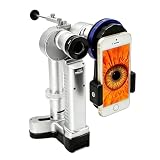
- Portability and Versatility: The handheld Slit Lamp offers the convenience of portability, making it suitable for various clinical settings and applications
- Durable Illumination: The high luminance white LED provides bright and consistent warm light for reliable illumination during examinations
- Extended Usage Time: The long battery life allows for extended usage without the need for frequent recharging throughout the day
- Convenient Recharging: The included battery charger provides a convenient recharging solution for uninterrupted usage during veterinary practice
- Comfortable Handling: The ergonomic design ensures comfortable handling during examinations, reducing hand fatigue for veterinary professionals
Comments and questions: keep public posts general
AAHA’s guidance on responding to comments is practical: answer public questions with general education, then move individual clinical matters into an appropriate practice channel, such as a phone call or a patient-record conversation. Prepare a standard reply for the most common response: “Thanks for asking. Every pet is different, so please call us so a veterinarian can look at your pet’s history.” Avoid describing a diagnosis, dose, or treatment plan in a comment thread, where you cannot see the animal’s history and where your reply will be read by everyone.
Language from the sources
AAHA’s Social Media Guide describes social media as “an essential tool to find, educate, and communicate with clients.” AAHA is describing its own professional guidance here, not a regulatory requirement. In a separate AAHA article, Cheyanne Flerx writes that “social media is the fastest and easiest way to communicate important information to clients.” That is her opinion in a practical article, not a measured comparison of channels.
What’s actually slowing this PC down?
Pick the symptom - the matching free tool is one click away.
Measuring whether the videos help
Track the goal you chose at the start. For a booking-focused video, count bookings that reference the video or the landing page it linked to. For an education video, count inquiries, website visits from the linked page, and questions that staff hear in the exam room. Views and likes are useful for checking reach, but they do not show whether the video changed client behavior.
Rank #4

- 【New Pet Collar Camera】 New 2K Pet Collar Camera with Video and Photo Functions, can be used to understand your pet's behavior and find out more information from your pet's eyes. Video function, 5 minutes per video,MP4 format, photos are saved in JPEG format on the memory card.With this cat pet camera, you can observe every place your pet has explored, and they capture memories and provide a cozy way to look back on happy times spent with your pet.
- 【Lightweight Multifunctional Camera】 Weighing in at only 1.5 ounces, this is a very compact action camera that you can take with you wherever you go. The collar camera with clip can be used as a dog collar camera, attach the miniature cat camera to your cat's collar, or hang it from a hat brim, collar or backpack for motion capture. It can also be used as a car camera, home security camera, baby camera, action camera, etc. to capture moments easily.
- 【Newly Upgraded Safety Accessories】The camera comes with a newly upgraded pouch, which is made of BPA-free, non-toxic rubber used in pet toys to ensure a comfortable use experience, with a choice of sizes, and the pouch can be adjusted to a 180° shooting angle, allowing you to see your pet baby's point of view more clearly.
- 【Cat Collar Camera with 240 Minutes Battery Life】Our cat collar camera comes with a 1200mAh solid capacity battery, and the rechargeable battery can last for about 240 minutes after fully charged. The camera can show you every move of your dog or cat that other cameras can't capture. Want to know where your dog or cat goes every morning? Or what they do when you're not around? With the Dog Collar Camera, you can get a glimpse into your baby's habits while you're away.
- 【Pet Collar Camera with 32GB SD Card】Best TF Card Attachment In order to meet the needs of all users, we equip you with a 32GB TF card, you don't need to buy it again to record your pets' daily adventures at any time.
Be careful with statistics you see in marketing articles. The VMA guide repeats a figure that it attributes to an American Pet Owners Association survey, including a claim that 45% of pet owners use YouTube. The original survey and its methodology were not traced, so treat that figure as unconfirmed and do not use it to justify your channel choice. Use your own clients and your own numbers to decide where to post.
No single platform or video length is established as best for every practice. Test a small batch, compare results against your goal after several weeks, and then repeat the formats that produce inquiries or bookings.
Once the first five or six videos are published and reviewed, the workflow above becomes your ongoing process: one question, one format, one owner for each step, and one measured result.
Free tools Windows power users keep installed
One-click scans. No signup required.
Quick Recap
“
Product prices and availability are accurate as of the date/time indicated and are subject to change. Any price and availability information displayed on Amazon at the time of purchase will apply.




