
The Tool Desk
Outbyte Driver Updater FREEFix the driver behind crashes, sound loss and screen glitchesFind Drivers →Outbyte PC Repair FREERepair Windows errors before they cause bigger problemsFix Now →Some links on this page are affiliate links: if you buy through them we may earn a commission, at no extra cost to you.
Murphy, a black Labrador associated with @thickboymurphy, makes his position on remote work unmistakable: he closes his mother’s laptop. In the DogTime video published October 28, 2026, Murphy sprawls across the blanket covering her, places a paw on the computer, and pushes the screen down whenever she tries to reopen it. The interruption is funny because it is immediate, physical and repeatable—but it also reflects a familiar work-from-home problem for dog owners: a pet demanding attention at exactly the wrong moment.
What does Murphy do in the video?
Murphy begins stretched across the blanket while his mother works on a laptop. He puts one paw on the lid and pushes the screen shut. When she opens it, he reaches forward, pulls the screen toward himself and folds it flat against the blanket.
As an Amazon Associate I earn from qualifying purchases.
What’s actually slowing this PC down?
Pick the symptom - the matching free tool is one click away.
She holds his snout and tells him to stop. Roughly two seconds later, he closes the laptop again. She laughs and says, “Excuse me,” before adding, “I’m working Murphy.” The on-video text says, “Someone has to pay the bills,” while the caption jokes that “That someone isn’t Murphy.”
The clip turns an ordinary interruption into a clear visual punchline: Murphy is not merely sitting near the computer; he is repeatedly making the computer unavailable.
Popular on Amazon
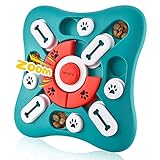
- 【PRODUCT SIZE】10 inch*10 inch*1.3 inch.
- 【3 WAYS TO PLAY, UPGRADE SLOW FEEDER】Our dog mental stimulation toys have a unique squeak button in the middle, which make it easier to attract the attention of dogs and cats. Three different difficulty designs and the 16-hole dog treat dispenser design maximize slow feeding time, even beyond 20 minutes.
- 【FUNNY STIMULATING TOYS】All kinds of dogs and cats love the puzzle game of Spin & Slide and the Seek & Hide with their smell sense and paw skills to find food. Combining circular orbit sliding game and linear orbit sliding game, smart dog and cat must move the slider correctly to get the food reward hidden in the maze.
- 【NON-REMOVABLE PARTS DOG PUZZLE】Our dog treat puzzle is made of non-toxic materials, very durable and suitable for pets to play for a long time. This dog toy has no removable parts because the design has built-in play parts that fold tightly and won't fall off easily.
- 【ANTI-SLIP & EASY TO CLEAN】: The four corners of the bottom are equipped with four anti-skid pads, which can be well fixed during the dog's slow food process; It is easy to clean, also dishwasher safe.
Why is the laptop-closing routine so funny?
The joke works without dialogue from the dog because his actions look deliberate and perfectly timed. Each attempt to resume work produces the same response, creating a short comic loop: laptop opens, Murphy intervenes, laptop closes.
The bill-paying text gives the behavior a mock workplace explanation. Murphy is treated as though he has rejected his mother’s job and volunteered himself as the office supervisor, even though the caption admits he is not contributing to the household expenses. His size and relaxed Labrador posture make the contrast especially effective: he looks comfortable while enforcing a very inconvenient policy.
PC Slower Than It Used to Be?
A free scan shows the junk files, broken settings and background clutter dragging Windows down - then fixes them in one click.Free scan · Windows 10 & 11Outdated Drivers Are Slowing You Down
One free scan finds every outdated or missing driver and matches the right update for your exact hardware.Free scan · exact hardware matchDogTime reported more than 3,100 likes for the post. Murphy’s account is also identified through a related Linktree profile as “Murphy | The Black Lab,” with links to Instagram and TikTok.
Why does a dog close a laptop when someone works?
A dog that blocks a screen or nudges a laptop is usually seeking access, attention or a change in the interaction—not making a judgment about the work itself. The computer has become a reliable signal that the person’s hands, eyes and voice are directed elsewhere.
Attention has a history
If closing the lid leads to petting, eye contact, laughter or a conversation, the interruption can become rewarding even when the person says “stop.” From the dog’s perspective, the behavior successfully changes what the human is doing.
The workday changes the household routine
Remote work can replace walks, play sessions or regular departures with long periods of stillness. A dog may notice that the person is physically present but emotionally unavailable, then try a direct strategy to restart contact.
Do these 3 things before closing this tab:
1Repair Windows errors before they cause bigger problems2Scan for outdated or missing drivers - takes under a minute3Clear out junk files and repair common Windows errorsBody position can invite contact
Murphy is lying on the same blanket as his mother, so he already has close physical access. A laptop placed within reach becomes an easy object to move, especially for a large, people-oriented dog.
These explanations describe common possibilities, not a diagnosis of Murphy’s motives. A sudden increase in clinginess, agitation or destructive behavior warrants a conversation with a veterinarian or qualified behavior professional.
How can you keep a dog occupied during focused work?
DogTime’s work-from-home guidance points to three practical levers: planned human attention, physical separation and independent mental stimulation. None has a published success rate or controlled comparison, so choose according to your dog, your space and the type of work block you need to protect.
Also popular on Amazon

- PLUSH SQUEAKY DOG TOY THAT WIGGLES, VIBRATES, & BARKS – Entice your dog to run, chase, play, and exercise. This interactive dog toy encourages fun stimulation for dogs of all ages. Fun dog toys for small dogs, dog toys for medium dogs, and large dog toys.
- REDUCE ANXIETY AND BOREDOM – With funny sounds and erratic movements, these funny dog toys & plush dog toy will capture your puppy or adult dog’s interest and keep them engaged with its interactive dog toy movements. The wobble and wiggle will keep them busy and is a great alternative to dog puzzle toys and classic dog enrichment toys.
- TIPS TO ACTIVATE: Pull out tab and give hard shake. If toy does not turn on, feel around for ON/OFF switch located underneath cover, hold button for 2 seconds, and give hard shake. The ball will activate, vibrating and making noise for approximately 10 seconds. Once this stops, the ball will reactive when rolled, thown, or played with. When playtime is over, simply press button down to turn dog ball off and preserve battery life. PLEASE SEE VIDEOS FOR HELP.
- BATTERY OPERATED PROLONGED PLAY – To change batteries, remove the plastic ball from plush toy cover. Use tab to open the giggle dog toy ball. Remove the battery compartment and insert 3 AAA batteries. This interactive dog toy has an automatic stop feature after a period without use to extend battery life. (Batteries are included with the Hyper Pet Doggie Tail)
- NEW COVERS AVAILABLE – Additional Hyper Doggie Tail covers are available for your pet. Hyper Pet is a Cosmic Pet Brand. Color of Doggie Tail Plush May Vary. Please always supervise your pet while in use.
| Approach | What it changes | How to use it |
|---|---|---|
| Scheduled play | Hands-on attention | Plan a walk, training session or play period before a meeting or concentration block. |
| Dog-free workspace | Physical access | Use a door, gate or separate room so the laptop and your hands are not available targets. |
| Interactive dog puzzle toy | Independent mental stimulation | Offer a safe, appropriate enrichment toy when you begin work, and supervise unfamiliar items. |
Start with a predictable routine
Give the dog an activity before settling at the computer, then keep short breaks on the schedule. Predictability makes the end of a play session less abrupt than repeatedly reacting only after an interruption.
Make the work area boring
If possible, place the laptop on a stable desk rather than within paw or muzzle range. A gate or closed door can prevent a dog from rehearsing the lid-pushing behavior while you teach an alternative.
Reward an alternative behavior
Provide attention when the dog is resting on a bed, mat or other designated spot. Calmly rewarding that choice gives the dog a way to obtain reinforcement without climbing onto the workstation or touching the computer.
Independent reader supportYour contribution helps us test, update, and keep practical guides available for everyone.What should you do if the behavior becomes disruptive?
- Protect the equipment first. Move the laptop out of reach and keep charging cables secured.
- Check the dog’s basic needs. Provide an age-appropriate toilet break, water, exercise and social contact before a long meeting.
- Interrupt the pattern without a game. Avoid turning every laptop closure into an extended chase, laugh or negotiation.
- Offer the replacement activity immediately. Guide the dog to a mat, chew or puzzle toy that has already been introduced safely.
- Escalate when necessary. Seek professional advice for panic when separated, guarding, aggression, compulsive behavior or a sudden unexplained change.
Never let a dog chew a laptop, battery, cable or toy that can splinter or release small pieces. Enrichment should match the dog’s size, chewing style and supervision needs.
Is Murphy actually trying to stop the bills from being paid?
No evidence in the published clip establishes that Murphy understands employment, money or laptops as a financial system. “Someone has to pay the bills” is the human-made caption that gives his attention-seeking behavior a playful workplace storyline. What the video does establish is simpler: Murphy repeatedly closes the screen when his mother resumes working, and the repetition is the source of the joke.
Free tools Windows power users keep installed
One-click scans. No signup required.
Frequently Asked Questions
Who is the dog in the laptop-closing video?
He is Murphy, identified as a black Labrador associated with the @thickboymurphy account. A related Linktree profile labels the account “Murphy | The Black Lab.”
Did Murphy close the laptop only once?
No. The published description says he shuts it, pulls it closed again after it is reopened, and repeats the action about two seconds after being told to stop.
What is the safest way to give a dog a puzzle toy during a meeting?
Introduce the toy while you are available to supervise, check it for loose or breakable parts, and select a size and difficulty suited to the dog. Remove it if pieces begin to break off or if the dog guards it aggressively.
Could repeated laptop interference signal separation anxiety?
Laptop blocking alone does not establish separation anxiety. Concern is greater when the dog also panics when left alone, vocalizes persistently, damages exits or shows other distress signs; a veterinarian or behavior professional can help assess that pattern.




Leave a Reply