You can take compelling wildlife photos with a smartphone by keeping the lens clean, holding the phone steady and avoiding heavy digital zoom. For distant birds, try photographing through binoculars or a spotting scope you already own; when a close-up is not practical, make the animal and its habitat part of the picture. Keep enough distance for wildlife to behave naturally.
Start with a clean lens and a steady phone
A smudge on a phone camera lens can soften an image or make bright areas look hazy. Wipe the lens gently with a clean lens cloth before you start, and check it again if you have handled the phone or put it in a pocket.
Brace your arms or rest the phone against a stable surface when possible. If you are using binoculars or a spotting scope, a tripod can steady the combined setup. Avoid tapping the shutter while trying to hold the phone aligned; a timer or remote shutter can reduce the movement caused by touching it.
Why do phone zoom photos look blurry?
On many phones, zooming in digitally crops and enlarges the image rather than capturing additional detail. That can make a distant animal look larger on screen while leaving the final picture soft or pixelated. National Geographic also cautions against relying on digital zoom in its wildlife photography guidance.
Do these 3 things before closing this tab:
1Fix the driver behind crashes, sound loss and screen glitches2Clear out junk files and repair common Windows errors3Scan for outdated or missing drivers - takes under a minute#1 Best Overall

- Upgraded 28x Telephoto Lens – Wider View & Easier Framing: Designed for everyday users, this 28x telephoto lens delivers a wider field of view than most 28x lenses, making it easier to find and frame distant subjects. Whether you're at a concert, a sports game, or just exploring nature, you'll get crisp, high-resolution close-ups without the hassle of perfect alignment.
- Advanced Optical Performance with Reduced Edge Darkening: Features a breakthrough light path design for an ultra-wide view and excellent light intake. The field-of-view ring helps reduce edge darkening, so you get a cleaner image with fewer dark corners (results may vary by phone model). High resolution and true color reproduction significantly enhance your mobile photography.
- Stable Long-Distance Capture & Monocular Function: With 28x magnification, capture clear and steady shots of distant subjects. The lens can also be used as a monocular telescope for extended observation—perfect for birdwatching, wildlife, or scenic views.
- Wide Compatibility & Versatile Use: Perfect for sports events, concerts, bird watching, wildlife observation, and travel. Compatible with iPhone, Samsung, Huawei, Xiaomi, OPPO, Vivo, and most other smartphones.
- Portable & User-Friendly: Crafted with high-quality glass and a durable yet lightweight body. The universal clip attaches securely to your phone, and the compact design fits easily in a pocket or bag—ideal for travel and outdoor adventures.
If you can get closer without disturbing the animal and without breaking local rules, moving closer may help. Otherwise, take a wider photo and crop it modestly later. A phone has limits in reach and in low light; enlarging a small, noisy image cannot restore detail the camera did not capture.
How to photograph birds through binoculars or a spotting scope
Digiscoping means aligning a phone camera with the eyepiece of binoculars or a spotting scope so the phone records the magnified view. It can help with distant birds when you already have suitable optics, but alignment takes care and results may show dark corners or other artifacts.
Rank #2

- 【2-in-1 Telephoto & Macro】: The phone camera lens kit is a lens that combines the dual advantages of a 6X telephoto lens and a 150mm macro lens (Needs to be mounted 150mm macro lens), which can not only take pictures of things in the distance, but also take intricate close-up shots up close. It is a perfect blend of far and near distance, breaking through the limitations of space, TM6 are ideal for you to enhance your cell phone photography.
- 【Professional Optical System】: TM6 TeleMacro Lens made of aluminum alloy housing and equipped with 7 groups of 10 premium glass elements. Each lens is meticulously coated with 3-5 layers across the entire surface, coupled with chromatic aberration correction, ensuring distortion<0.6%, transmittance>99.5%, reflectance<0.3%. This high-performance lens captures the finest details and truest colors, enhancing image clarity and sharpness for a truly authentic representation.
- 【Adjustable Focus】: The focal length of this newly upgraded telephoto macro phone lens can be adjusted by rotating the focus ring, making it easy to capture clear images of things miles away or as close as 150mm-400mm. 37mm large aperture eyepiece, so that your observation field of view is wider, installed in the cell phone shooting can be adjusted to the cell phone magnification to 2.4X can get a full-screen display, reduce the area of dark corners.
- 【2 Models & Easy to Use】: The telephoto macro lens for iphone supports 2 modes of use, cell phone shooting and naked eye observation. With the eyecup installed, you can as a monocular telescope lens to help you view distant objects or close up tiny things. Attach the lens clip to your phone with the lens mounting hole facing the phone's main camera, then attach the zoom macro lens. (Telephoto optimal shooting distance: 300mm+∞, Macro optimal shooting distance: 150mm-400mm)
- 【Widely Compatible】: The telephoto macro phone lens kit can fit most popular types and models of smartphone, such as iPhone, Samsung Galaxy and Note, Google Pixel, Huawei, Oneplus, etc. (Suitable for all smartphones with a width of 70-100mm(2.8-3.9"), but it doesn't apply to the smaller iPhone Mini and SE series.) If you have an iPhone 13 and newer and Samsung Galaxy S22 S23 Ultra, disable the camera's macro feature before use. (The macro lens is not intended to magnify distant objects.)
- Set up the optics securely. Stabilize the binoculars or spotting scope, using a tripod where appropriate.
- Align the phone camera with the eyepiece. Move the phone until the camera sees a centered image through the optics. A phone-to-optics adapter can make alignment easier than holding the phone by hand.
- Check the fit before buying an adapter. Confirm that the adapter works with your phone, its case and the particular eyepiece; compatibility varies.
- Frame and focus carefully. Check the screen for dark edges, vignetting or misalignment, then adjust the phone and optics rather than relying on a heavy digital crop.
- Reduce camera shake. Use a timer or remote shutter if available, and wait for movement to settle before taking the picture.
Audubon’s smartphone bird-photography guide describes using phone controls such as ISO and shutter speed. Controls and formats differ by phone and camera app. Where those controls are available, a faster shutter can help freeze a moving bird; maintaining exposure may require a higher ISO, which can add image noise. Treat specific app and file-format suggestions in older guides as historical rather than current recommendations.
| Approach | Best fit | Trade-offs |
|---|---|---|
| Phone alone | Quick, lightweight photos when the animal is reasonably close or a habitat view will work. | Simple to use, but the phone’s reach is limited; digital enlargement can cost detail. |
| Phone with binoculars or a spotting scope | Distant birds when suitable optics are already available. | Can provide a magnified view, but needs careful alignment, compatible mounting and a steady setup; dark corners or alignment artifacts may appear. |
An adapter helps hold and align the phone; it does not itself add magnification. Audubon’s photography gear guidance is a starting point for understanding equipment options.
The Tool Desk
Outbyte PC Repair FREEClear out junk files and repair common Windows errorsFree Scan →Outbyte Driver Updater FREEScan for outdated or missing drivers - takes under a minuteDriver Scan →Rank #3

- 3 in 1 Phone Camera Lens Set: Every lens can be used separately. The 20X Macro lens has a best focusing distance of 1.18-3.54 inch, help you to explore the microworld. 120° Wide lens can expand the shooting area of 10%, make a bigger view to the world. 198° Fisheye lens can produce a strong visual effect to make thing cuter
- High Quality: Professional HD Lens with advanced lanthanide optical glass can reduce the reflection and ghosting, bringing you amazing vision with details and clarify. High quality grade aluminum shell can protect the glass offering a long durability
- Clip-on Phone Lens: Easy Use Design. Just attach the lens to the clip and clip it on the phone camera, then you can enjoy the amazing effect of the lens. The clip has soft rubber to avoid scratch on your phone. Strong spring can hold on tightly
- Compatible with Most Smartphones: Universal design of 3.6 cm clip make the lenses compatible with most iPhone, Samsung google phone etc. Note: For different model you might have to use different way to clip the clamp.
- Package Content: 1x 120° Wide Angle Lens, 1x198° Fisheye Lens, 1x 20X Macro Lens, 1x Universal Clip, 1x Storage Bag, 1x User’s Manual
Make the habitat part of the photograph
If a distant animal would become a blurry close-up, show where it is and what it is doing instead. A bird perched above a shoreline, foraging in grass or moving through a tree can make a strong photograph even when it occupies only a small part of the frame. A low or eye-level viewpoint can add immediacy when you can reach it without trampling habitat or getting closer to the animal.
Choose the composition for the way you plan to share it: horizontal framing may suit one use, while vertical framing may suit another. Neither orientation is a universal rule.
Rank #4

- Multi-Scene Shooting: Bring the distant world to your fingertips. Perfect for concerts, bird watching, wildlife, and sports events like the soccer matchs or baseball games. Whether you‘re in the stands or out in nature, this 28X telephoto zoom lens with tripod captures every detail your phone’s camera would otherwise miss【PLEASE NOTE: This 28x telephoto lens is only capable of focusing on scenes beyond 3 metres; objects within 3 metres cannot be brought into focus.】
- For clear photos: Before installing, loosen the clip screw. Align the telescope with the main camera, cover other cameras. Shoot from at least 3m. If blurry, check alignment, clip tightness, camera coverage, distance, lens settings, and lens cleanliness; then slowly turn the focus ring until sharp, keep steady or use a tripod. If vignetting, zoom to 2.0x–2.4x. If still blurry, contact support.
- Complete Kit – Everything You Need in One Box: Comes with 28X telephoto lens, eyecup, tripod, storage case, cleaning cloth, and lens stickers. No extra purchases needed. Lightweight and portable, it slips easily into your bag. Important: This lens is designed for distant subjects (over 10ft/3 meters). Not for close-ups or selfies. Use the tripod for best results
- Universal Compatibility – Check Your Phone Thickness: Fits most smartphones up to 0.67in (17mm) thick including your phone case. Compatible with iPhone, Samsung Galaxy/Note, Google Pixel, Huawei, OnePlus, and more. Please measure your phone (with case) before purchase. Also compatible with most Android and iOS devices. Universal clip-on design makes installation simple
- High-Resolution Clarity: Capture distant subjects with high-resolution clarity, not blurry digital zoom. This lens lets you zoom in on faraway subjects while maintaining sharp detail – no more grainy, pixelated images. Perfect for shooting a player’s expression on the field, or a bird‘s feathers from a distance
Keep wildlife comfortable and safe
Let the animal’s behavior set your distance. Audubon’s ethical bird photography and videography guide advises giving birds enough space to behave naturally. If your presence makes a bird flush or otherwise change its behavior, stop approaching and back away.
- Do not deliberately make birds fly, bait animals for a picture or disturb habitat.
- Take particular care near nests: do not approach, alter cover, flush adults or prolong a visit.
- Use flash sparingly, and avoid flash on nocturnal birds at night.
- Follow local rules and any site-specific distance requirements.
- Consider removing GPS location data from images of rare or sensitive wildlife to reduce the risk of exposing a location.
National Geographic quotes photographer Beverly Joubert: “The ethics of photography are the same as the ethics of life, and all revolve around respect.” Read its ethical wildlife photography article for further context. The 2026 Audubon Photography Awards rules permit phone photos, including digiscoping, and set contest-specific grounds for disqualification involving stressed or harassed birds, certain nest photos and baiting. Those are contest rules, not a substitute for local laws or site guidance.
Quick Recap
Best Value
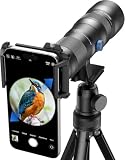
- 【Excellent HD Optical Lens】: The telephoto lens for smartphone equipped with crystal-clear HD optical glass and full multilayer coatings reduce ghosting, it delivers brilliant resolution, minimal color aberration, and exceptional color accuracy and edge - to - edge clarity. The lens is a 13-lens, 10-group design with ≥99.5% light transmission, ≈95% reflectivity, and low distortion ≤ |4%|. Offering exceptional telephoto power and reshaping long - distance image aesthetics.
- 【20X-60X Powerful Magnification】: This HD telephoto phone lens features versatile 20X-60X magnification, allowing you to seamlessly adjust from a broad overview to intricate details. With its dynamic lens focusing system, you can lock onto your target with ease and precision, getting sharp details. Ideal for target shooting, bird watching, hiking, camping, archery, and more.
- 【CNC Aluminum Alloy Material】: Crafted with precision, our zoom telephoto lens features a durable high - precision CNC aluminum alloy body, with a surface treated by an anodizing process, ensuring excellent wear and scratch resistance. At just 741g, this lightweight, compact scope comes with a handy storage bag for easy portability. Whether you're into archery, bird - watching, wildlife viewing, hiking, camping, landscape - gazing, or stargazing, it's your go - to gear for outdoor adventures.
- 【Fits 58mm Filters】: Its 58mm large objective lens offers greater ability to concentrate light, a broad field of view for easy ground observation and quick target acquisition. Plus, the lens thread allows attachment of various 58mm filters, for example: UV, VND, CPL, starburst filters and other filters. Adding versatility and fun to your viewing and photography endeavors.
- 【2 Models & Easy to Use】: The telephoto lens for iphone supports 2 modes of use, cell phone shooting and naked eye observation. With the eyecup installed, you can as a monocular telescope lens to help you view distant objects or close up tiny things. Attach the lens clip to your phone's main camera, you can take photos or videos of the observation object on your cell phone to use as a collection or record.then attach the spotting scopes, offering multiple fun experiences for you.
Product prices and availability are accurate as of the date/time indicated and are subject to change. Any price and availability information displayed on Amazon at the time of purchase will apply.




