For an unattended woodland, field edge, or other site without dependable power and Wi‑Fi, start with a trail camera. It is built to sleep until movement triggers a photo or clip, run for long periods from batteries, and save footage to a memory card. Choose an outdoor security camera when the location has suitable power and network access and you need live viewing, frequent notifications, or convenient remote playback. If the site is remote but footage must reach your phone, a cellular trail camera can bridge the gap—provided the exact model has coverage where you install it and its data service works for your intended use.
There is no universal winner. The right choice depends on how the camera will be powered, how footage will be retrieved, how often animals pass, and whether you need live access or simply reliable evidence of what visited.
As an Amazon Associate I earn from qualifying purchases.
Trail camera or security camera: the short answer
| Installation situation | Best starting point | Reason |
|---|---|---|
| Remote woodland, field edge, or property without Wi‑Fi or mains power | Standard trail camera | Motion-triggered capture, battery operation, and local card storage avoid a network connection. You must visit to retrieve the card. |
| Remote site where footage must be delivered to a phone | Cellular trail camera | It can transmit over a mobile network instead of the property’s Wi‑Fi. Coverage and a model-specific data plan are essential. |
| Backyard or outbuilding near a powered, connected home | Outdoor security camera | It can provide live view, alerts, and frequent remote access when its power and network requirements are met. |
| Powered wildlife site needing remote access and animal-focused capture | Compare a wildlife/cellular model with a security camera | Check detection behavior, framing, night illumination, local storage, alerts, and recurring service costs rather than relying on the product category name. |
What each camera is designed to do
Trail cameras
A conventional trail camera is a self-contained camera trap. It remains idle until its sensor detects movement or a change in heat, then records a still image or video clip. Most setups save files to removable storage, so the usual workflow is to mount the camera, leave it in place, and return later to collect the card.
This design suits wildlife because the camera can operate where there is no household network. It also limits transmissions and power use. The trade-off is access: unless the model has cellular connectivity, you cannot see a new image while you are away, and a failed battery or full card may go unnoticed until your next visit.
#1 Best Overall

- 64MP Photos & 1296P HD Videos: Equipped with a high-quality optical lens and advanced image sensor, the E5S captures ultra-sharp 64MP photos and smooth 1296P HD videos.
- Low-Power, Eco-Friendly Wildlife Viewing: Simply retrieve the SD card to see what your camera has captured—each visit could bring a new surprise. Non-Cellular and Non-WiFi operation ensures minimal power use, fewer battery changes, and zero disturbances.
- Rugged & Weather-Resistant: Built to withstand harsh outdoor conditions with an IP66 waterproof rating. Features a 1/4"-20 mounting thread for secure placement on trees, posts, or fences. Ideal for use as a durable trail camera.
- Fast 0.1s Trigger Speed with 3 PIR Sensors: Never miss fast-moving deer wildlife. Three PIR sensors enable a lightning-fast 0.1s trigger speed motion activation, perfect for hunting purposes.
- Extended Power Options & Efficient Design: Powered by 8×AA batteries (not included). For continuous outdoor use, the E5S supports the GardePro SP350 Solar Panel (sold separately), ensuring reliable power even in remote areas.
Cellular trail cameras
A cellular trail camera keeps the motion-triggered, wildlife-oriented workflow but adds a mobile-data connection. It can send selected photos or clips and may allow remote status checks or live access, depending on the model and service. It still needs a usable cellular signal at the mounting location, adequate power, and whatever plan or account the manufacturer requires.
Cellular does not mean network-independent. It removes the need for the property’s Wi‑Fi, not the need for a carrier network. Check coverage at the actual site, not only at your home address, and read current service terms before installation.
Security cameras
An outdoor security camera is normally designed for a home, driveway, or building. Models commonly assume continuous power or frequent charging and a Wi‑Fi or wired network. Their strengths are live viewing, app notifications, two-way or remote controls on some models, and convenient access to recent recordings.
Those strengths can help with wildlife in a yard, but security-oriented motion detection may be tuned to people, vehicles, or larger changes in the scene. A camera can be excellent at notifying you that someone entered a driveway while missing a small animal moving at the edge of the frame, generating too many alerts from foliage, or recording only short events. Examine the exact detection zones, trigger options, recording rules, and animal classifications.
The decision factors that matter most
1. Power at the installation site
Start with the power question before comparing image resolution. If there is a weather-protected outlet or an established low-voltage system, a security camera may be practical. If there is no outlet, a trail camera’s replaceable or rechargeable batteries are usually simpler.
Solar can reduce visits, but compatibility is model-specific. The selected camera must support the particular panel, connector, charging behavior, and mounting arrangement. For example, the manufacturer lists the Go Ranger PT as compatible with Solar Panel 2; that statement applies to that product configuration, not to trail cameras generally. Verify whether a panel is included, optional, or sold separately and how shade, winter daylight, and vegetation will affect charging.
Rank #2

- 𝐍𝐎𝐓𝐄: 𝐢𝐭 𝐢𝐬 𝐍𝐎𝐓 𝐜𝐨𝐦𝐩𝐚𝐭𝐢𝐛𝐥𝐞 𝐰𝐢𝐭𝐡 𝐡𝐨𝐦𝐞 𝐖𝐢𝐅𝐢, 𝐝𝐨𝐞𝐬 𝐍𝐎𝐓 𝐬𝐮𝐩𝐩𝐨𝐫𝐭 𝐜𝐞𝐥𝐥𝐮𝐥𝐚𝐫/𝟒𝐆/𝟓𝐆 𝐧𝐞𝐭𝐰𝐨𝐫𝐤𝐬, and 𝐝𝐨𝐞𝐬 𝐍𝐎𝐓 capable of real-time motion alerts or push notifications. The camera creates its own short-range Wi-Fi hotspot (𝐍𝐨𝐧-𝐂𝐞𝐥𝐥𝐮𝐥𝐚𝐫) for setup, and downloading files only. Wi-Fi range is up to 33–50 ft in open areas. The camera records automatically even when your phone is not connected. No subscription or monthly fees
- Upgraded Split Solar Panel Design: This trail camera features a Allows flexible placement design. Its angle can be manually adjusted to efficiently face the sun, regardless of seasonal changes or terrain. This greatly improves charging efficiency and minimizes sunlight blockage, making it suitable for all kinds of outdoor environments (32GB SD card included (pre-installed). No extra charge)
- Non-Stop Solar Power: Equipped with a high-capacity 6000mAh rechargeable power, this trail camera supports three charging modes: solar charging, Type-C charging, and rechargeable power. It allows for long-term continuous use. No more wasting money or climbing. It is the truly energy saving, and long-lasting solution for 24/7 backyard, farm, and deep-woods surveillance
- Easy & Smart App Control : This wifi trail camera pairs instantly via WiFi + Bluetooth with the user friendly “TrailCamGO” app, with a maximum connection range of 55FT (recommended within 10FT). Photos and videos can be send directly to your phone without removing the SD card. (As the wireless trail camera creates its own hotspot to connect with the phone, it does not support home Wi-Fi networks.)
- 4K & 64MP Ultra-Clear Imaging: With a high-resolution sensor and excellent low-light performance, this solar trail camera minimizes image and video blur or noise, enabling quick wildlife recognition and capturing every detail clearly.Ideal for birdwatching, spotting wildlife, and keeping an eye on your garden/home
2. Network access
A standard trail camera can work entirely offline. A Wi‑Fi security camera cannot deliver remote viewing when the site has no usable network, even if the camera itself is powered. A cellular trail camera can transmit from a remote location, but the service depends on carrier coverage, an activated plan, and the model’s supported bands and region.
What’s actually slowing this PC down?
Pick the symptom - the matching free tool is one click away.
Before choosing cellular, stand at the proposed camera position with a phone on the relevant carrier if possible, then confirm the camera’s own coverage requirements. Signal can be weaker under a forest canopy, in a hollow, or behind terrain. Confirm whether the plan charges by image, clip, data volume, or a recurring allowance; terms vary and can change.
3. How footage is captured and retrieved
Decide whether you need evidence of an animal’s visit or an immediate view of what is happening. Motion-triggered stills and short clips saved to a microSD card are often sufficient for species checks, feeding-station observations, and checking a remote gate. Remote delivery is more useful when the animal is rare, the site is difficult to reach, or you need to respond quickly.
Ask these questions for the exact model:
- Does it record stills, video, or both when motion is detected?
- Can you adjust trigger sensitivity, delay, clip length, or a schedule?
- Is local storage supported, and what card capacity and format are accepted?
- Can files be downloaded remotely, or are only thumbnails or alerts sent?
- What happens when the card is full or the data allowance is exhausted?
4. Detection behavior and animal size
Wildlife does not approach a camera like a person walking up a driveway. Small mammals may cross the lower edge of the frame, birds may trigger the sensor at close range, and vegetation may move repeatedly in wind. Positioning and sensor settings therefore matter as much as the camera label.
Look for an adjustable detection zone, sensitivity levels, a useful trigger delay, and a field of view that matches the trail or feeding area. A wide view can show more habitat but may make a distant animal appear small. A narrow view can produce larger subjects but requires more accurate aiming. No specification replaces a clear line of sight through the detection zone.
Crashes, No Sound, or Screen Glitches?
Random freezes, missing sound and display glitches usually trace back to one bad driver. Find and replace yours safely.Free scan · under a minuteWindows Errors? Fix Them Before They Spread
Repair common Windows errors and clear accumulated junk for a smoother, more stable PC - no reinstall needed.Free scan · no reinstall5. Night illumination
Night wildlife observation raises two separate questions: whether the camera can expose a usable image and whether its illumination may affect the animals. Infrared systems are common, but wavelength and visibility differ by model. The manufacturer of the Go Ranger PT specifies 940 nm “no-glow” infrared and says it is designed for wildlife monitoring. That is a product-specific manufacturer claim; it does not establish that every 940 nm system is invisible to every species or that illumination can never alter behavior.
Rank #3
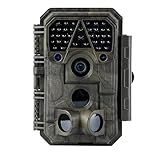
- Crystal-Clear 64MP Photos & 1296p HD Video – Stunning detail day or night, thanks to advanced image tech and a high-performance f/1.6 aperture lens.
- Lightning-Fast 0.1s Trigger Speed – Never miss a moment! Side sensors detect motion instantly, even for fast-moving wildlife, deer.
- Bright 100ft No-Glow Night Vision – Invisible 940nm LEDs and enhanced light capture deliver sharp nighttime footage without spooking animals.
- Smaller Files, Faster Playback – H.264 tech compresses videos (MP4/MOV) for quick downloads and seamless viewing on any device.
- 2.4" Color Display + User-Friendly Controls – Review footage on the spot with an intuitive menu and easy-access buttons.
Check whether the camera uses white light, red-glow infrared, or no-glow infrared, and consider the species, distance, and habitat. Avoid assuming that a “night vision” label describes image detail, illumination range, or animal response.
6. Coverage, framing, and pan-tilt
A fixed camera records only what its lens and sensor can see. Clear a narrow corridor without stripping the whole site of cover: animals may avoid an exposed device, and moving branches can create false triggers. Aim across—not directly along—the expected path when you want a side profile and a longer time in the detection zone.
Pan-tilt can let a connected camera reframe or patrol a broader area. It does not eliminate the need to mount the camera securely, set useful limits, and ensure that the animal is large enough in the image. A moving view can also make comparisons between visits less consistent.
7. Storage, alerts, and service costs
Local storage reduces dependence on a cloud account but requires physical retrieval and enough card capacity. Cellular or cloud delivery adds convenience and recurring costs that depend on the exact product and region. Include battery replacements, solar accessories, memory cards, data service, and travel to the site in your budget. Current terms should be checked on the manufacturer’s service page rather than inferred from another model.
When a security camera is a good wildlife choice
A security camera can work well when the habitat is close to your home and you can provide stable power and connectivity. It is particularly useful for a garden, porch, barn, or water feature where you want to open an app and see the area immediately. Live view can help you adjust feeding schedules, check whether an animal is present, or confirm that a camera has not been obstructed.
Configure it for wildlife rather than accepting default security settings:
Rank #4

- 【Ultra-clear Photos and Videos】36MP Still Images & 2.7K Videos. Thanks to premium optical lens and an advanced image sensor, and built-in 22Pcs 850nm low glow LEDs, this trail camera provides crystal clear images and amazing smooth 2.7K videos with sound in the daytime, low light or nighttime, combined with noise reduction speaker and 2.0” HD TFT Color Screen, which takes you into the world of wildlife.(This camera does not include an SD card.)
- 【Super Night Vision & Low Glow Infrared LEDs】The trail camera is equipped with powerful low glow infrared LEDs, features upgraded 850nm infrared technology, makes this game camera more stealth, which can show the night behavior of animals without disturbing them, encompasses adaptive illumination technology to avoid overexposure or over-dimmed, which can provide clear night images and videos in total darkness, delivers brilliant night vision up to 75ft.
- 【Fast 0.1s Trigger Time &130°Wide Angle】Once movements are detected, the lightning-fast trigger speed of less than 0.1s with 1 to 3 shots choice guarantees fast and accurate capture of each detected motion exposed to the field, never miss any animals that wander by this camera. 130° detection range to give you an expansive field view, indispensable for hunting, wildlife observation, farm monitoring, home backyard, plant growth observation, property security and surveillance.
- 【Easier Setup Than Ever】This hunting camera features a built-in 2.0-inch color screen and TV remote-style control buttons. No Wi-Fi or app is needed; the intuitive and easy-to-use interface allows for quick setup and instant playback, making it suitable for users of all ages. The included mounting strap and stand allow you to stabilize the camera in various scenes and at any angle. A comprehensive user guide helps you quickly get started using this hunting camera.
- 【IP66 Waterproof】KJK201 is designed to withstand extreme environments, thanks to the tightly integrated design of the camera body and high-quality rubber ring, ensuring that works normally from -22 °F to 158 °F, excellent quality can be used in deserts, rainforests, etc. The efficient PIR design works to reduce false triggers, boasting an impressive 17,000-image battery life! The smaller size makes them easier to conceal from theft/vandalism, and also much easier to carry out into the field.
- Choose the view. Aim at a predictable path, nest box, pond edge, or feeding area. Exclude moving branches and reflective surfaces where possible.
- Create a detection zone. Mask roads, sidewalks, and tree canopies that would otherwise produce irrelevant events.
- Test sensitivity. Walk through the scene at the approximate size and distance of the animal you want to record, then review missed triggers and false alerts.
- Set recording behavior. Select event clips or continuous recording according to the camera’s storage and power limits. Verify clip length and cooldown time.
- Check night mode. Confirm that infrared or white-light activation does not illuminate neighboring property or disturb the viewing site.
- Review retention. Make sure recordings remain available long enough for you to examine them, and export important observations before automatic deletion.
If the camera cannot reliably trigger on the target animal, a wildlife-specific trail camera is likely the better tool even when Wi‑Fi is available.
Free tools Windows power users keep installed
One-click scans. No signup required.
When a standard trail camera is the better choice
Choose a standard trail camera when a site visit to collect the card is acceptable and the priorities are independence, low connectivity requirements, and unattended operation. This is common for a remote woodland, field margin, conservation plot, or seasonal route.
Before leaving it in place, confirm battery type and expected replacement procedure, card compatibility, weather sealing, time and date settings, trigger delay, and whether the camera resumes recording after a full card or low battery. A simple test at home can reveal an incorrectly formatted card, a loose battery door, or a time zone error before those problems cost a week of observations.
When a cellular trail camera is worth the added complexity
A cellular model is justified when remote delivery changes what you can learn or how quickly you can act. Examples include a site that is difficult to reach, a short observation window, or a need to know immediately when a rare species appears. It is not automatically better for routine monitoring: a weak signal, expensive data use, or frequent charging can make an offline camera more dependable.
Compare the exact model on these points:
- Supported cellular network and coverage at the installation point.
- Whether a plan is mandatory, what it includes, and how overages are handled.
- Which files are transmitted and whether full-resolution originals remain on the card.
- Battery or external-power requirements during repeated transmissions.
- Remote controls, status reporting, and recovery options if the camera goes offline.
Moultrie’s cellular-camera guidance identifies detection range, flash type, power setup, and the data plan as selection factors. Treat those as a checklist, then verify the specifications and service terms for the model you are actually considering: Moultrie cellular trail cameras.
Recommended Free Tools
Product example: what a hybrid wildlife camera can combine
The Go Ranger PT product page describes a cellular wildlife/trail camera with pan-tilt coverage, 4K 8MP capture, wildlife detection, microSD storage, rechargeable power, optional Solar Panel 2 compatibility, and remote cellular access. The manufacturer also lists 940 nm no-glow infrared and an F1.6 aperture for night vision. These are stated specifications and claims, not independent comparative test results.
Best Value

- HARVEST MORE BUCKS THIS SEASON - EDGE 3 delivers real-time deer activity, movement patterns, and location intelligence—so you know when and where mature bucks are moving instead of hunting on hope.
- AI BUCK DETECTION + INSTANT ALERTS - Moultrie AI identifies bucks and immediately delivers high-resolution photos or HD video—reducing false alerts and helping you act fast when it matters most.
- NATIONWIDE 4-CARRIER AUTO-CONNECT - Automatically connects to the strongest of four major U.S. networks. No SIM cards. No manual setup. Reliable photo and video delivery—even in remote hunting properties.
- 40MP PHOTOS + 1080p HD VIDEO - Capture crisp, detailed images and lifelike HD video. Low-glow infrared flash keeps nighttime shots clear without spooking deer.
- 0.5-SECOND TRIGGER + 100FT RANGE - Fast trigger speed and long detection range ensure moving deer are captured cleanly—no blur, no missed opportunities.
“The camera features crystal-clear night vision thanks to the F1.6 large aperture and 940nm no-glow infrared LEDs, the latter of which are specially designed for wildlife monitoring as they are invisible at night.”
— Reolink product page, Go Ranger PT
The example illustrates why category labels overlap. A camera can have trail-camera triggering and wildlife detection while also offering cellular remote access and pan-tilt controls associated with connected security equipment. Use the specification sheet for the exact edition and region; do not assume another model in the same product family has identical power, storage, or service requirements. A broader cellular-camera comparison is available from the manufacturer’s store: cellular camera comparison.
Installation procedure for reliable wildlife footage
- Define the observation question. Decide whether you are identifying species, counting visits, watching behavior, or checking a property. The answer determines whether delayed card retrieval is acceptable and how wide the view should be.
- Map the animal’s route. Look for tracks, scat, browse marks, tracks through grass, water access, and pinch points. Place the camera where an animal is likely to cross the detection zone, not merely where the scenery looks attractive.
- Check power and communication. For a security camera, test the outlet and network at the mounting position. For a cellular trail camera, confirm the carrier signal and activate the required plan before final mounting.
- Prepare the camera. Insert compatible batteries or connect the approved external power, format or install the supported microSD card, set the date and time, and select still, video, or combined capture.
- Mount securely. Use a stable tree, post, or bracket. Keep the lens level, leave room for the animal’s approach, and protect cables from rubbing, chewing, and water entry.
- Set the frame and detection zone. Review the live view or test images. Keep the horizon and expected animal path in frame, and mask moving vegetation where the camera permits.
- Run a trigger test. Walk through the target area at several distances and directions. For a small animal, test low in the frame. Confirm that the first image is not delayed until the subject has passed.
- Test a night cycle. After dark, verify focus, exposure, infrared behavior, and whether the camera records the full animal rather than only a bright face or partial body.
- Record the setup. Note the location, orientation, settings, battery state, card capacity, and installation date. This makes later changes explainable.
- Schedule checks. Inspect batteries, card space, lens cleanliness, straps, solar charging, signal status, and water ingress at an interval appropriate to the weather and the camera’s service demands.
Placement, privacy, and responsible observation
Wildlife cameras can unintentionally record people, neighboring yards, paths, or private activities. Laws and privacy rules depend on where the device is installed and what it captures; there is no single jurisdiction-free rule to apply everywhere. Aim the camera to limit incidental recording, avoid pointing into windows or adjoining property, and check the requirements that apply in your location.
The Tool Desk
Outbyte PC Repair FREEClear out junk files and repair common Windows errorsFree Scan →Outbyte Driver Updater FREEScan for outdated or missing drivers - takes under a minuteDriver Scan →Use camouflage and distance thoughtfully. Do not block an animal’s route, alter a den, repeatedly approach a nest, or place food solely to force close approaches unless that practice is appropriate for the species and local guidance. A visible light, repeated visits, or a newly cleared path can change the behavior you are trying to observe.
The Defenders of Wildlife Trail Camera Guide 2025 explains trail-camera components and the distinction between standard and cellular setups. For background on evaluating motion-activated cameras in wildlife investigations, see the California Department of Fish and Wildlife’s comparison of motion-activated cameras. The latter is an older comparison document, not a current ranking of consumer products.
Troubleshooting common failures
No images are recorded
- Confirm the camera is armed rather than in setup or test mode.
- Check battery orientation, charge, and contacts.
- Verify that the card is supported, inserted correctly, and formatted as the manufacturer specifies.
- Recheck the detection zone and sensitivity; the animal may be outside the sensor’s effective area.
- Look for a closed lens cover, condensation, or an obstructing branch.
Too many empty triggers
- Move the camera away from grasses and branches that move in wind.
- Reduce sensitivity or narrow the detection zone if the model allows it.
- Change the angle so the sun does not flare directly into the lens.
- Check whether insects close to the lens are reflecting infrared illumination.
The camera records the animal too late
- Reduce trigger delay if the setting is available.
- Aim across the path so the animal remains in the detection zone longer.
- Move the camera closer only if doing so will not disturb the site or exceed the model’s minimum focus distance.
Cellular delivery fails
- Test signal at the camera’s exact position and reorient or relocate it if needed.
- Confirm that the plan is active and that the device supports the local network.
- Check battery level; repeated transmissions can increase power use.
- Verify that the account, app, and camera firmware requirements are satisfied.
- Keep local recording enabled when possible so an outage does not erase the observation.
Night footage is unusable
- Clean the lens and remove spider webs, condensation, or protective film.
- Check that the animal is within the camera’s actual infrared illumination distance.
- Reframe the shot to avoid reflective water, pale surfaces, or a nearby trunk dominating exposure.
- Compare no-glow, red-glow, and white-light options according to the species and disturbance risk.
A practical buying checklist
- Site: remote, suburban, enclosed, exposed, shaded, or vulnerable to tampering.
- Power: outlet, replaceable batteries, rechargeable pack, or approved solar accessory.
- Connection: offline card retrieval, Wi‑Fi, wired network, or cellular service.
- Capture: stills, video, trigger delay, clip length, detection zones, and schedules.
- Night mode: illumination type, stated wavelength, and likely effect on the species.
- Framing: field of view, minimum focus distance, fixed or pan-tilt lens, and mounting stability.
- Storage: microSD support, remote download behavior, retention, and what happens when storage fills.
- Maintenance: battery access, weather protection, lens cleaning, strap or bracket durability, and visit frequency.
- Ongoing charges: cellular data, cloud storage, replacement batteries, solar equipment, and travel.
- Privacy: camera angle, masking tools, signage where appropriate, and local requirements.
Bottom line for the three most common setups
Remote land with no Wi‑Fi
Use a standard trail camera if collecting the card is acceptable. Upgrade to cellular only when remote delivery is worth the plan, power, and coverage requirements.
Wildlife in a connected backyard
Use an outdoor security camera when live view and alerts are more valuable than long unattended battery operation. Test its animal detection rather than assuming security motion settings will work for every species.
Powered site needing dependable wildlife monitoring and remote access
Compare a cellular wildlife camera and a security camera feature by feature: trigger behavior, local storage, night illumination, framing, power, alerts, and recurring service costs. The exact model—not the category name—determines whether it fits.
Quick Recap
Product prices and availability are accurate as of the date/time indicated and are subject to change. Any price and availability information displayed on Amazon at the time of purchase will apply.




