
The Tool Desk
Outbyte Driver Updater FREEFix the driver behind crashes, sound loss and screen glitchesFind Drivers →Outbyte PC Repair FREEClear out junk files and repair common Windows errorsFree Scan →Some links on this page are affiliate links: if you buy through them we may earn a commission, at no extra cost to you.
Keep dog hair and pet odors away from gaming hardware by controlling what reaches the equipment: place the PC or console on a hard, elevated, open surface; inspect and clean vents and filters on a schedule suited to your room; and treat smells in the room rather than spraying the electronics. Hair and dust can restrict airflow, while smoke, vapor, oils and fragranced sprays may be pulled through cooling fans and leave residue on components.
The safest routine is device-specific. A desktop case, laptop and console have different vent layouts and cleaning limits, so use the maker’s instructions before applying any tool or method. The procedures below combine manufacturer guidance with practical pet-household habits.
As an Amazon Associate I earn from qualifying purchases.
Why dog hair and odor are a gaming-hardware problem
Every actively cooled computer or console moves room air through vents. Loose fur, dander and ordinary dust can collect on intake grilles, filters and fan blades. As that layer grows, less air reaches the heat-producing parts and the fans may have to work harder. The result can be higher operating temperatures, more fan noise, or thermal throttling. Hair is not automatically an overheating event; the risk rises when buildup blocks an intake or exhaust.
Odor is a separate issue. A fan does not distinguish between clean air and air carrying smoke, vapor, cooking grease, essential-oil mist or air-freshener chemicals. A support guide for the Wii warns that airborne contaminants can be drawn into the console and specifically advises avoiding smoke, oils and air freshener near it (Nintendo’s cleaning guidance). A PC likewise draws surrounding air without first purifying it, so room contaminants can settle on internal surfaces.
Popular on Amazon

- Enhanced and upgraded, the Type 6 is the ultimate performance Air Duster for professional use. Use stage 1 for delicate items or unleash full fury with stage 2. Perfect for cleaning tech devices including PC’s, consoles, tv’s and servers as well as appliances around the home like fans, filters and radiators.
- FULLY EQUIPPED: The AirTec Type 6 is supplied with 6 interchangeable nozzle attachments as well as 3 ESD cleaning brushes. Use the brushes in combination to agitate thick or caked on dust for the ultimate detailed finish. Pack everything away into the supplied canvas drawstring bag for convenience and easy storage.
- EVEN MORE POWER: Packing a 480w motor, the AirTec offers high performance airflow of 125mph whilst only using a small amount of power. Having an electric duster reduces the need for wasteful canned air dusters which quickly run out steam.
- ESD PROTECTION: Constructed from an ESD protected ABS housing, the Type 6 is suited to challenging industrial usage. The ergonomic design is easy to handle and operation could not be simpler with one button control.
- ON DEMAND: No recharging or refills needed, AirTec runs directly from main’s power. Simply plug in the 3 metre power cord and begin with just one flick of a switch.
Pet smell usually comes from dander, skin oils, bedding, carpets or accidents in the room—not from the graphics card or console itself. Cleaning the hardware cannot deodorize the whole room, and spraying fragrance into a vent can add residue while masking the source. Control the room and the airflow path instead.
Start with placement that limits hair intake
Use a hard, stable, elevated surface
Set a desktop tower on a rigid desk, stand or shelf that cannot wobble. Keep a console on a hard surface rather than carpet. Nintendo’s Wii guidance cautions against carpet because fibers and dust can be drawn toward the system fan. A PC-support guide likewise recommends a stable, elevated position. Elevation also makes it easier to see an intake, remove a filter and vacuum the floor without blowing debris upward.
Recommended Free Tools
Do not place equipment directly beside a dog bed, crate, grooming area, food bowl or litter box. Those locations have concentrated fur, dander, dust and odors. If the setup must share a room, put the tower or console on the side with the cleanest air and create a clear route for exhaust to leave the area.
Keep every intake and exhaust open
Leave the clearance specified by your case, console or laptop maker around front, side, top and rear openings. Do not push a tower against a wall, trap a console in a closed cabinet, or cover a laptop’s underside with a blanket. Never drape cloth over a device while it is running. Warm exhaust that cannot escape is recirculated into the intake, reducing cooling even when the vents look clean.
Map the airflow before cleaning: identify where cool air enters and where warm air exits. On a desktop this is often front or bottom intake and rear or top exhaust, but layouts vary. Consoles and laptops differ even more, so do not assume a vent location from another model. Keep cables, controllers and storage boxes from forming a pile over a grille.
Manage the floor around the setup
Vacuum or mop the floor around the gaming station so normal movement does not launch settled fur into an intake. A vacuum with a sealed dust path can remove hair from carpet and upholstery; avoid waving a brush or broom directly beside a running computer. Groom dogs and shake blankets in another area, then allow airborne dust to settle before returning to the room.
Also popular on Amazon
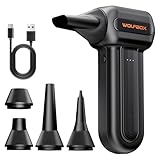
- 110,000 RPM Power Air Duster: Engineered with a brushless motor reaching up to 110,000 RPM in third gear. This electric air duster blasts away microscopic dust and crumbs from keyboards, computer cases, and radiator fans. "1-min maintenance, 10-min deep clean" for PC gamers and tech enthusiasts.
- 3 Speeds & Long Runtime: Features 3-speed settings: Gear 1 (25K RPM) for delicate electronics, Gear 2 (60K RPM) for daily dusting, Gear 3 (110K RPM) for tough debris. With 2*2500mAh batteries, it runs up to 240 mins on Gear 1 and fully charges in 3.5 hours.
- Lightweight & Portable Design: Weighing only 0.5 lbs.Our mini air blower is exceptionally easy to handle and carry. Its compact size fits perfectly in a camera backpack or car glove box, making it ideal for on-the-go photographers and campers who need to clean lenses or clear campsite debris quickly .
- Reusable & Cost-Effective Investment: Replaces disposable canned air that run out quickly and freeze up. This cordless air blower is rechargeable and designed for repeated use, saving money in the long run by eliminating the need to constantly buy canned air . It serves as a sustainable cleaning partner for electronics, home surfaces, keyboards, and delicate gadgets.
- Versatile Cleaning Tool: The WOLFBOX MF60 Electric Air Duster comes with 5 nozzles: a flat nozzle for blowing dust off PC cases and desks, a long nozzle for deep cleaning computer keyboards and car vents, a round all-purpose nozzle, and a swim ring/air mattress nozzle for outdoor inflation and camping. From electronics to car care and outdoor life, it's an all-in-one solution.
A repeatable hair-and-dust cleaning routine
Inspect before you open anything
Power the device down through its operating system, switch off the power supply where applicable, unplug it and let hot parts cool. Look through external grilles with a light. Check removable case filters, the front panel, bottom intake, rear exhaust and the space around the fan hub. On a laptop, inspect the intake and exhaust slots without removing the chassis unless the manufacturer documents that procedure. For a console, follow the model’s support instructions rather than copying a desktop teardown.
Record what you see. A thin, loose film calls for routine cleaning; mats of fur, visible blockage or a sudden increase in fan noise call for immediate attention and a shorter inspection interval. If a device is overheating, shutting down or showing temperature warnings after cleaning, stop gaming and use the manufacturer’s service guidance.
Clean exterior surfaces safely
- Disconnect power. Remove the power cable and peripherals. Keep liquids away from openings.
- Use a dry microfiber cloth. Wipe metal or plastic panels, stand surfaces and the area around vents. MAINGEAR specifically recommends microfiber for compatible exterior surfaces (its system-cleaning guide).
- Work away from the intake. Wipe the desk and nearby shelves so you do not push a line of fur into a grille.
- Clean screens according to their maker’s instructions. Do not spray cleaner onto a monitor, laptop or console. Apply only a product the display maker permits to a cloth, if its instructions allow it.
Microfiber removes loose hair and dander from smooth surfaces; it cannot replace filter cleaning. Wash or replace the cloth when it becomes loaded with fur so you do not redistribute the debris.
Clean removable PC filters
Many desktop cases have magnetic or slide-out filters at the front, bottom or top. With the PC unplugged, remove only the filters the case manual identifies as removable. Take them outdoors or to a utility area, brush or vacuum loose fur from the filter, and clean it using the case maker’s stated method. Let a washed filter dry completely before reinstalling it. A damp filter can introduce moisture into the case and restrict airflow.
Skytech’s PC cleaning guide describes removable case filters and an electronics-safe electric duster as PC-oriented options (Skytech’s cleaning guide). That advice does not automatically apply to a laptop, game console or a different case. If a filter is torn, warped or no longer seals against its frame, replace it with the correct part instead of leaving a gap for hair to bypass it.
Use compressed air or an electric duster without overspeeding fans
Air tools can dislodge packed fur, but a concentrated jet at close range can damage a fan. ASUS warns that strong airflow close to laptop fans can harm the blades (ASUS laptop-cleaning guidance). MAINGEAR instructs users to hold PC fans still while using compressed air (MAINGEAR’s cleaning guide).
Also popular on Amazon

- Unleashes Powerful Airflow – Designed with a high-powered motor, the DataVac Electric Duster delivers an intense air stream that removes stubborn dust, pet hair, and particles from electronics, keyboards, vents, appliances, and even your car’s nooks and crannies.
- Endlessly Versatile – More than a computer cleaner: use it to deep-clean closets, ceiling fans, baseboards, under furniture, window sills, dryer vents, kitchen drawers, and more. It's the secret weapon for power dusting your entire home.
- Eco-Friendly & Cost-Effective – No more single-use air cans. This plug-in duster is reusable, environmentally friendly, and built to last—some users report over a decade of reliable use before even thinking about replacing it.
- Compact But Built Like a Tank – Its small size makes it ideal for indoor use without sacrificing strength. Lightweight and easy to store, yet rugged enough for serious jobs.
- Replaceable Filter & Easy Maintenance – Comes with a washable mesh filter. Quick to remove and clean—just pop it out, blow it off, and keep going.
- Choose the right tool. Use only an electronics-oriented duster or compressed-air product whose instructions permit computer cleaning. Do not use an air compressor set to an unknown pressure.
- Prevent fan spin. Hold a fan hub or blade with a nonconductive object so the rotor cannot freewheel. Never force the blade sideways or press hard on it.
- Use short bursts. Aim across the surface, not deep into a bearing, and keep the nozzle at the distance specified by the tool and device instructions.
- Move debris outward. Blow from the cleaner side toward an opening, while keeping your face away from the dust stream. Clean outdoors when possible.
- Recheck filters and vents. Air that exits one grille can settle on another, so inspect the whole airflow path before closing the case.
Do not use an air jet on a powered-on device, and do not spin a fan rapidly to “test” it. If the device is a sealed laptop or console and you cannot safely restrain the fan, stop at external cleaning or use authorized service.
How often to inspect and clean when you have pets
There is no universal interval: shedding level, carpet, smoking, open windows and room construction change the load. MAINGEAR gives these environment-dependent intervals for its systems:
Windows Errors? Fix Them Before They Spread
Repair common Windows errors and clear accumulated junk for a smoother, more stable PC - no reinstall needed.Free scan · no reinstallCrashes, No Sound, or Screen Glitches?
Random freezes, missing sound and display glitches usually trace back to one bad driver. Find and replace yours safely.Free scan · under a minute| Environment described by MAINGEAR | Suggested cleaning interval |
|---|---|
| Low dust with hardwood floors | Every 6–12 months |
| Pets, carpet, smoke or open windows | Every 3–6 months |
These are MAINGEAR recommendations, not a standard for every PC, console or laptop. In a home with a heavy shedder, inspect the intake monthly even if a full internal cleaning is less frequent. Shorten the interval when you see a visible film, hear fans ramping up, or find fur on a filter. Extend no interval merely because the calendar says so if the vents are visibly blocked.
A practical inspection calendar
- Weekly: Look at external grilles, wipe the desk and remove visible hair from the stand and cable area.
- Monthly: Check intake filters and the floor or carpet immediately around the station; compare fan noise and temperatures with your normal baseline.
- Every 3–6 months in a pet or carpeted room: Perform the deeper, power-off filter and exterior cleaning that your device and case instructions permit.
- After grooming, shedding seasons or a renovation: Inspect sooner because airborne hair and dust can spike.
Keep a simple date-and-observation log. “Front filter clear,” “fur mat at bottom intake,” or “fan noise normal” gives you a device-specific history without pretending that one schedule fits every room.
Keeping pet odors out without damaging electronics
Remove the source first
Wash dog bedding and blankets on their care label, clean upholstery and rugs, and address accidents with a cleaner intended for that surface. Empty waste bins and keep food containers closed. Odor control works best when the material producing the smell is removed; masking it near a fan only sends more airborne chemicals toward the hardware.
Ventilate the room when outdoor conditions allow, but avoid directing a dusty outdoor draft straight at an open PC. Keep smoking and vaping away from the setup. MAINGEAR notes that smoke and vapor residue can accumulate inside PCs because the system draws in room air (MAINGEAR’s airflow guidance).
Do these 3 things before closing this tab:
1Scan for outdated or missing drivers - takes under a minute2Repair Windows errors before they cause bigger problems3Fix the driver behind crashes, sound loss and screen glitchesAlso popular on Amazon

- POWERFUL AIR BLOWER: 500-watt motor delivers strong airflow. Use as a handheld blower, dust blower, or mini air blower to clean electronics, PCs, and workstations.
- ANTI-STATIC DESIGN: ESD safe system includes grounded 3-conductor cord and wrist strap. Protects sensitive electronics during PC cleaning or repair.
- DURABLE ALL-STEEL BUILD: Rugged, professional-grade body built to last. This small blower replaces disposable canned air for long-term savings.
- PORTABLE & VERSATILE: Lightweight design functions as a portable blower or computer air duster. Ideal for pc cleaning kit setups at home or in IT shops.
- COMPLETE ACCESSORY SET: Includes crevice tool, dusting brush, micro cleaning tool kit, and grounded wrist strap. The ultimate pc cleaner air duster solution.
Do not spray the device or its air path
Never spray air freshener, deodorizer, essential oils, disinfectant or household cleaner into a vent, around a fan or onto a powered device. Nintendo’s Wii support guidance specifically warns against air freshener, oils, smoke and other airborne contaminants near the console because the fan can draw them inside (Nintendo’s cleaning instructions). Fragrance compounds can leave a film on dust and components, while liquid droplets can create an electrical hazard.
If a room still smells after cleaning, move the device temporarily to clean air while you locate the source. Do not attempt to deodorize an internal circuit board with household products. Persistent odor from the hardware itself, especially a hot-plastic or burning smell, is a reason to shut it down, unplug it and seek the maker’s support.
Using an air purifier as an optional room aid
A room purifier can reduce some airborne particles when correctly sized and maintained, but it is not an internal filter for a PC or console and it is not a guaranteed pet-odor cure. Place it where its intake and outlet are unobstructed, away from the device’s exhaust, and follow the purifier maker’s room-size and placement instructions. The goal is to improve the air before it reaches the gaming equipment, not to blast air directly into a vent.
HEPA filtration targets particles such as dust and dander. Odor control depends on the model’s sorbent media and on replacing that media when exhausted. Honeywell’s InSight-series guidance recommends replacing its prefilter and optional Enhanced Odor & VOC filter every three months and its HEPA filter every 12 months, while noting that contaminant levels affect filter life and performance (Honeywell InSight filter guidance). Those intervals apply to that series only; use another model’s manual for its schedule.
When a purifier is worth considering
- The room has persistent airborne dander despite regular cleaning.
- Windows must remain closed for long periods and ventilation is limited.
- Smoke or vapor exposure cannot be fully avoided, although eliminating that exposure near electronics is preferable.
A purifier cannot remove fur already packed into a filter, clean a dusty heatsink or replace laundering and floor cleaning. Keep inspecting the gaming device even when the room air seems fresher.
Independent reader supportYour contribution helps us test, update, and keep practical guides available for everyone.Device-specific precautions
Desktop PC
Follow the case and component manuals before removing panels. Clean accessible filters first, then exterior surfaces and permitted internal areas with the fans restrained. Keep the tower elevated and its front, side, top and rear openings clear. If temperatures remain abnormal after a permitted cleaning, check that every filter and panel is seated correctly and contact the builder or component maker rather than repeatedly applying stronger air.
Also popular on Amazon

- CLEAN WITH AIR: Unleash a continuous jet of fresh air to quickly remove stubborn dust and debris from wherever it may be lingering. Perfect for cleaning delicate tech devices including PC’s, consoles, tv’s and servers as well as appliances around the home like fans, filters and radiators.
- MULTIPURPOSE: The AirTec Type 3 is supplied with 6 interchangeable nozzle attachments for enhanced control and versatility. The finer nozzles provide increased accuracy, whilst the larger nozzles offer broader cleaning power.
- PLANET FRIENDLY: Using a super energy efficient 350w motor, the AirTec offers high performance output whilst only using a small amount of power. Having an electric duster reduces the need for wasteful canned air dusters which quickly run out steam.
- SMALL BUT MIGHTY: Weighing in at only 1.5lb, the AirTec packs a lot into its small and robust ABS housing. The ergonomic design is easy to handle and operation could not be simpler with one button control.
- ON DEMAND: No recharging or refills needed, AirTec runs directly from main’s power. Simply plug in the 6.5ft power cord and begin with just one flick of a switch.
Laptop
Laptops often draw air through narrow underside or side openings, so a blanket, lap or pet bed can block them. Use a hard surface while gaming. Limit home cleaning to the external procedure documented for your model; ASUS specifically cautions against strong, close-range airflow at laptop fans. Do not insert cotton swabs, cards or vacuum nozzles into a vent unless the maker expressly instructs you to.
Game console
Keep the console on a hard, open surface and follow its model-specific cleaning page. The Wii guidance is an example of why carpet, smoke, oils and air freshener are poor neighbors for a fan-cooled console, but another console may have different openings and service limits. Do not open a console under warranty unless the manufacturer permits it.
Free tools Windows power users keep installed
One-click scans. No signup required.
Troubleshooting common problems
“The fans are louder after my dog sheds.”
Power down and inspect the intake filter and exhaust for a fur mat. Clean only the parts the device or case instructions identify as accessible, then verify that no panel, cable or furniture blocks airflow. If noise continues, compare temperatures with your normal readings and use authorized service if the device overheats or shuts down.
“The room smells clean, but the PC still smells.”
Stop using fragrance sprays near the equipment. Check bedding, carpet, waste bins and upholstery, then inspect the PC’s filters and accessible surfaces while it is unplugged. A persistent electrical, burning or hot-plastic odor is not a pet-odor problem: disconnect power and seek technical support.
“Can I vacuum the inside?”
Do not assume a household vacuum is safe for exposed components. Static, accidental contact and excessive suction can damage parts. Use the cleaning method specified by the case or device maker; where compressed air or an electronics-safe duster is allowed, restrain fans and use short bursts. For a sealed laptop or console, choose external cleaning or professional service.
Quick Recap
A low-risk routine for a pet-friendly gaming room
- Move the PC or console onto a hard, stable, elevated surface with clear intake and exhaust space.
- Relocate beds, blankets, grooming supplies and food away from the airflow path.
- Each week, wipe exterior surfaces and remove visible fur from the desk and floor.
- Each month, inspect grilles, filters, cable gaps and fan noise while the device is off.
- Every three to six months in a pet or carpeted environment, perform the deeper cleaning permitted by the device and case manuals; use the longer six-to-12-month interval only where the MAINGEAR low-dust, hardwood-floor conditions genuinely fit.
- Handle air tools cautiously: power off, unplug, restrain fans and avoid strong close-range jets, especially on laptops.
- Control odor at its source through laundering, surface cleaning and ventilation. Keep sprays, oils, smoke and vapor away from intakes.
- If you add a purifier, treat it as room-level particle and odor support and replace its filters according to that model’s instructions.




Leave a Reply