The Tool Desk
Outbyte Driver Updater FREEScan for outdated or missing drivers - takes under a minuteDriver Scan →Outbyte PC Repair FREERepair Windows errors before they cause bigger problemsFix Now →For a sharper, more expressive dog portrait, focus on the nearest visible eye, use soft light, simplify what’s behind the dog, and take the picture when the dog is naturally attentive. For movement, switch to continuous autofocus and a tracking area that can keep the dog in frame; raise shutter speed as the action gets faster. No special camera or new lens is required to get started.
Start with the eyes—and verify focus
In a close portrait, the eyes are usually the clearest place to focus. If your camera or phone offers animal-eye detection, enable it and check that its focus indicator is on the eye you want. Treat the feature as an assistant, not a guarantee: fur across an eye, low or harsh light, a small face in the frame, similar eye and coat colors, or a restless dog can defeat detection. If it misses, tap the visible eye on a phone or select a smaller autofocus point on a camera. Nikon’s guide to animal-detection autofocus illustrates eye detection and focus-area alternatives.

For a still pose, place focus on the nearer eye. If the dog turns its head, the eye farther from the camera may fall outside the sharp area, especially with a wide aperture and close framing. Check the photo at full size and refocus if the eyes are soft.
Choose a focus approach for the dog’s movement
For a posed or mostly still portrait
Single autofocus can work when the dog is holding still, but even a calm dog may move its head. Continuous autofocus—often labeled AF-C, Servo AF, or a similar term—can keep adjusting focus as that happens. Dog photographer Elke Vogelsang says she retains AF-C even for dogs sitting nicely because they may move their heads. The exact modes and labels vary by camera model.
#1 Best Overall

- 【Full HD Pet Collar Camera】: Capture crystal-clear Full HD videos and high-quality photos directly from your pet’s perspective. Perfect for understanding your pet’s behavior and discovering the world through their eyes. Each video records up to 5 minutes in AVI format, while photos are saved in JPEG format on a memory card.(Memory card not included in the box)
- 【Compact Mini DV Camera】: Featuring a 0.96-inch LCD screen, this Mini DV camera allows instant playback and easy operation. Use the included Type-C card reader to transfer SD card videos to your computer or smartphone for quick access and sharing.
- 【Lightweight Action Camera】: Weighing just 0.77 Ounce, this compact action camera is portable and versatile. With up to 30 frames per second, it’s perfect for capturing pets, mountain biking, travel adventures, and more. Comes with accessories for different uses.
- 【Wide-Angle Lens Upgrade】: Equipped with a 170° ultra-wide-angle lens and 6 layers of optical glass, this camera delivers sharp and distortion-free images. Slight anti-shake function ensures perfect framing, making the shots/video more stable.
- 【Adjustable 315° Back Clip】: The exclusive upgrade includes a back clip that allows 315° angle adjustments for flexible shooting. Ideal for recording daily life, travel, and pet activities.
For a dog running or playing
Use continuous autofocus and an area that can follow the dog: a zone, wide area, or animal-aware tracking mode, depending on the camera. Keep the dog inside the active area as you pan. If detection drops or the dog leaves the zone, reacquire focus before continuing rather than firing a long burst while the camera focuses on the background. Fujifilm’s subject-detection AF guidance describes this fallback to the selected AF zone when detection is interrupted; menus differ, so look for the equivalent on your model.
Set shutter speed for the action, then balance the light
A still dog can tolerate a slower shutter speed than one sprinting toward you, but a head turn or twitch can blur a seemingly quiet portrait. Treat published shutter speeds as starting points, not guarantees: motion, distance, lens, light, and the dog’s direction all affect the result.
Rank #2

- 【Dual WiFi Antennas for Ultra-Responsive Control & Interaction】 --- Dual antennas ensure a powerful, stable connection for instant button response. Control the pan-tilt camera smoothly in real-time with zero lag, so you never miss a moment of playful interaction with your pet.
- 【Stunning 2K HD Clarity for Your Pet】 --- Watch your pets in incredible 2K HD detail. This indoor pet camera provides a crystal-clear view, so you can see exactly what your dog or cat is up to, from their playful expressions to their favorite toys.
- 【360° Panoramic View & Full Control】 --- See every corner of your room with complete 360° pan and tilt coverage. Control the cat camera view right from your phone app to follow your pet's movements and ensure they are safe and sound.
- 【Instant Motion Detection Alerts】 --- Get immediate alerts sent directly to your phone when motion is detected. This essential feature for any pet cam helps you monitor your pet's activity and restless behavior the moment it happens.
- 【Clear Night Vision with 11 IR LEDs】 --- See every movement in total darkness with 11 advanced infrared LEDs. This dog camera with phone app provides clear black-and-white video all night long for non-stop, peaceful monitoring.
| Situation or example | Starting point reported | Context |
|---|---|---|
| Active pets | At least 1/500 s | Nikon Professional Services’ A-mode and Auto ISO setup; guidance for its specified Nikon models. Nikon NPS |
| Animal photography | 1/500 s or faster | Sony’s example setup, published in 2017. Sony |
| Freezing an action moment | Around 1/2000 s | Fujifilm’s subject-detection action example, updated April 4, 2025. Fujifilm |
| Photographer’s usual practice | At least 1/1250 s in most cases; 5 fps bursts | Elke Vogelsang’s personal workflow described in a 2022 interview, not a universal recommendation. FUJIFILM X Stories |
When the light is dim, open the aperture or raise ISO to preserve a useful shutter speed. Raising ISO can make image noise more visible; opening the aperture reduces how much of the dog stays in focus. If the photo is still blurry, try a faster shutter speed and accept some noise rather than relying on a slow exposure for a moving subject.
A short burst can improve the chance of catching a fleeting look or leap. Anticipate the movement, focus on the face, and shoot deliberately rather than holding the shutter down without checking focus. Sony recommends anticipating action and pre-focusing on the face in its animal-photography guidance.
Rank #3

- Pet’s-Eye View Camera: Ever wonder what your cat sees? Our Cat Camera Collar captures high-definition videos from your pet’s perspective, letting you watch their playful adventures and feel closer to them, even when you’re apart.
- One-Button Recording: This collar camera is simple to use—no Wi-Fi or app needed. Just press a button to record up to 1 hour of video in a loop. Perfect for capturing spontaneous pet moments! (Micro-SD card required, not included.)
- 1080P HD with Night Vision: Despite its small size, this dog collar camera records in 1080P HD and features night vision, so you can see your pet’s nighttime escapades or hiding spots in low light. (Note: No anti-shake feature; fast movements may cause blur.)
- Easy Video Access: Watch your pet’s recordings effortlessly by connecting the camera to your laptop via USB or using a micro-SD card reader. Relive their adventures anytime! (Micro-SD card sold separately.)
- Lightweight & Comfortable: Designed for Medium-size dogs and big-size cats under 44 lbs, this M-size collar weighs just 0.7 oz. Made from soft, durable nylon, it’s comfortable for playtime while keeping the camera securely in place.
Use light and background to make the face stand out
Find soft, even light
Overcast daylight or open shade is a forgiving starting point because it reduces harsh patches of sun and shadow across fur. Watch the dog’s face, not just the overall brightness: dark eyes can disappear against a dark coat if they fall into shadow. Nikon’s pet-portrait examples show how backlight can outline fluffy fur and create eye catchlights, but check that the face remains visible before relying on it.
Keep the background quiet
Before taking the picture, look past the dog for bright objects, distracting lines, or strong colors that compete with its expression. Move your position or reframe to remove them. A wide aperture can blur a busy background, but it also makes focus more critical. A smaller aperture keeps more of the face sharp; it can be especially useful when photographing several dogs, whose eyes may not all lie in the same plane.
A fast prime lens may help in a dim room or when you want a softer background, but it is optional. Check that any lens fits your camera mount, and choose an aperture with enough depth of field for the parts of the dog you want sharp. Nikon’s comparison of f/1.8 and f/4 is an illustration of the trade-off, not a requirement to buy a particular lens.
Try the dog’s eye level
Photographing from the dog’s eye level often makes the portrait feel more direct. If it is safe and comfortable, crouch or sit rather than lifting or positioning the dog. Take a few frames from other angles too; a higher viewpoint can offer a useful variation without asking the dog to hold a pose.
Recommended Free Tools
Best Value
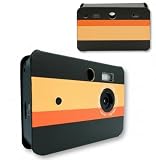
- 20MP HD SCREENLESS DIGITAL CAMERA WITH FLASH: Capture high-resolution 20MP photos and HD video with zero screens or digital distractions. Features a built-in flash designed for clear low-light shooting, giving you authentic retro film-style photos with modern clarity.
- SCREEN-FREE & SCREENLESS FOR DIGITAL DETOX: Designed to keep you fully in the moment—no preview screen, no glare, and zero notifications. Compose your shots through the viewfinder, embrace the element of surprise, and review your memories after transferring them.
- COMPLETE STARTER KIT WITH 32GB SD CARD: Everything you need is included right out of the box—comes bundled with a 32GB microSD card, pre-installed rechargeable battery, USB-C charging cable, and a built-in flash so you can start shooting immediately.
- FAST & EASY USB-C PHOTO TRANSFER: Plug directly into any PC, Mac, or laptop using the included USB-C cable with no extra app or software required. Memory card mounts instantly for seamless file drag-and-drop.
- COMPACT RETRO POINT & SHOOT WITH SWAPPABLE CASES: Ultra-portable design measuring 4.41 × 2.99 × 0.65 inches and weighing just 8.1 oz. Fits easily in pockets or bags for travel, parties, and everyday adventures, with swappable outer cases to customize your look.
Time the photo around the dog
Watch for the expression or movement you want instead of expecting the dog to stay posed. A relaxed gaze, familiar head tilt, yawn, shake, or moment of play can all make a more individual portrait. If you use a treat, toy, or sound to get attention, start gently and let the dog’s reaction guide what happens next. Canine Partners suggests a toy or brightly colored object as an attention cue; a squeaker is optional and may not suit every dog.
Keep the session low-pressure. Pause or stop if the dog seems uncomfortable, and make room for breaks. Canine Partners suggests a maximum half-hour session in its practical guide, while the 2022 FUJIFILM X Stories interview describes longer sessions with accommodations and breaks. These are different practical examples, not a single ideal duration: follow the individual dog’s comfort.
Use flash cautiously, if at all
Available light is a simple first choice. If you need flash indoors, Nikon advises bouncing it from a wall or ceiling rather than directing it into a pet’s eyes. Its guidance also warns that the AF-assist illuminator may adversely affect some animals’ eyes and recommends turning it off for the specified setup. Follow your camera’s instructions and avoid using light that disturbs the dog.
Quick Recap
A practical portrait sequence
- Settle the scene. Choose soft light, remove distracting background elements, and get to a comfortable distance and angle.
- Choose focus. Enable animal-eye detection if available, or select the nearest visible eye with touch or point focus.
- Match autofocus to movement. Use a still-subject mode for a reliably quiet pose if appropriate; choose continuous autofocus and a tracking zone for head movement or action.
- Choose a shutter speed. Start around 1/500 s for active pets, then go faster as movement demands and light allows. Adjust ISO or aperture if needed.
- Watch and shoot in short bursts. Anticipate the dog’s attention or movement, check that focus is on the face, and pause to review the result.
- Follow the dog’s cues. Use only familiar, gentle attention cues and stop or take a break if the dog is no longer comfortable.
Product prices and availability are accurate as of the date/time indicated and are subject to change. Any price and availability information displayed on Amazon at the time of purchase will apply.




